Your license. Your installation.

Licenses

Already have a User ID? Generate a license key below. New to Magic RDS 4? Choose a license further down the page.
If you want to use the program for free, you do not need a User ID or a license key.

Already purchased?

Generate your license key.

Your User ID identifies the purchased license. Your Installation ID identifies the Windows installation where you will use it.

Licensing on this new site is being prepared. Existing users can use the current service on Pira.cz.

Open the existing license-key service

Use the User ID you received by email when you purchased your license.

Where do I find it?

Copy it from Help – License Manager in Magic RDS 4.

New users

Choose your license.

Download and evaluate Magic RDS 4 before purchasing. Check the feature comparison to choose the right option.

Discover and try out

Basic License

FREE

Got automatically upon download.

You can try out all the program's features. Familiarize yourself with the controls, set up connections and RDS content, generate your own set of texts, monitor the output, or broadcast RDS directly. No registration required.
Free for our RDS encoders

Activated License

FREE

Unlimited number of installations.

Take advantage of all the features and benefits of our RDS encoders. Automatic activation upon connection. No registration required — just download, connect and use.
Single PC

Standard License

$59 USD

For one Windows PC.

Lifetime license · Future updates included
Up to 5 PCs

Full License

$290 USD

For multiple installations and larger setups.

Lifetime license · Future updates included

Checkout on this new site is being prepared. You can currently purchase your license on Pira.cz.

Open the existing checkout

Your User ID will be sent here. Leave blank to use your PayPal email address.

Activation & everyday use

License FAQ

Where do I find the Installation ID?

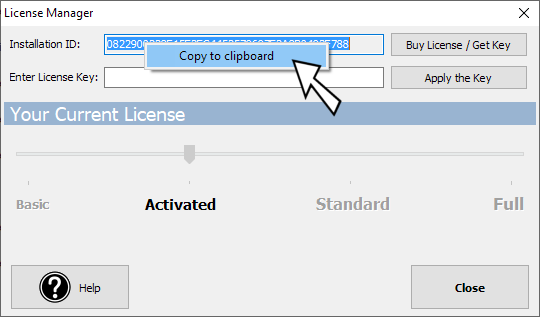
In Magic RDS 4, open Help – License Manager. Right-click the Installation ID and choose Copy to clipboard, then paste it into the form above.

Back to the key generator
What is the difference between User ID and license key?

Your User ID identifies your purchase and is sent by email. The license key is generated for a specific Installation ID and is entered into the application. Keep your User ID so you can generate another key when moving to a new installation.

I lost my User ID. Can I recover it?

Enter the email address used for your purchase. Your User ID will be sent to that address.

Recovery is currently available through the existing license service.

What is the difference between Basic, Activated, Standard and Full?

The options differ in supported devices, output limits and additional functions. See the license comparison PDF for the full feature matrix.

All program features are available even with the Basic license, which is free of charge and valid immediately upon installation. You do not need to purchase a license if you wish to explore the program's features or use it for testing purposes. The program is also free of charge when it is used to control supported RDS encoders from our production.

Does the paid license expire?

No. Standard and Full licenses are lifetime licenses and include future updates.

Do I need to buy a new license when moving to a new PC?

No. Use your existing User ID with the new Installation ID to generate a new key. The old key remains valid for a transition period so you can move your setup.

Can I upgrade from Standard to Full?

Yes. If you already own a Standard license, you can upgrade to Full by paying the price difference. Please contact us by email and include your existing User ID. Upgrades are currently handled individually and are not available through the online checkout.

Which payment methods are available?

The online checkout accepts PayPal payments. Depending on your location and PayPal’s availability, you may also pay by credit or debit card without a PayPal account. If you prefer to pay by bank transfer, please contact us and we can issue a proforma invoice.

Can I run several application instances on the same PC?

Yes. Licensing is tied to the Windows installation, not to the number of application instances. Standard covers one PC at a time; Full can be used on up to five PCs.

Does the target PC need internet access?

No. You can generate the key using an internet-connected computer, then apply it on the target PC. Local device control does not require the target computer to be online.

Need help with your license?

Contact Pira.cz with your purchase details or ask a general question in the Technical Forum.

Visit the Technical Forum