
RDS middleware
Configure RDS services, manage devices and distribute content across your broadcast network.
Add value to your broadcast. Control RDS encoders, deliver now-playing text and automate tasks from one place.

From a single encoder to a broadcast network, keep your content and devices working together.
Configure RDS services, manage devices and distribute content across your broadcast network.
Turn playout data, files and online sources into Radiotext, RT+ tags, web content and streaming metadata.
Schedule content and text sources, run event-driven tasks and record MP3 audio by time or keywords in your programme text.
Assemble the individual nodes like building blocks, tailored to your needs. The home screen gives you a status of all outgoing connections.
Depending on the connection kind or the selected model, various communication types and formats are available to you.
For each connection, you can view the device model you are communicating with and the data you are sending over that connection.
Configuration of your RDS encoder, depending on the capabilities of the specific model.
Simply specify which text sources you want to include in the text loop and where you want to send them. You can create as many of these rules as you need.
You don't need to know anything about the structure of XML files. Simply select the elements containing the desired content with just a few clicks.
For external text sources, use direct assignment or templates. For fixed text messages, you can insert RT+ elements directly into the text.
You can the Simple HTTP model in several ways: for sending text to your website or streaming server, or even for sending specific control commands to the API of your device.
Your technician no longer needs to remember the IP address of each encoder in the network. He can manage all supported RDS encoders from one device under his login.
Use Magic RDS 4 with supported Pira.cz encoders, third-party devices and metadata destinations.
Connect a supported encoder and activate the application instantly through the connection.
Check all device modelsPaid options cover additional encoder families and use beyond supported free encoder control.
Start with the task in front of you. Connect more sources, destinations and actions as your requirements grow.
Combine artist and title information with station messages, news or weather. Read text from local or shared files, XML, JSON and online sources, then shape it for each destination.
Turn text sources on or off automatically based on a schedule, detected keywords or how recently their text has changed. Disable a source if its text stays unchanged for too long, and let another source take over.
Use bridges and virtual ports to route data between applications and devices. Distribute one source to several encoders, filter commands or translate supported encoder protocols.

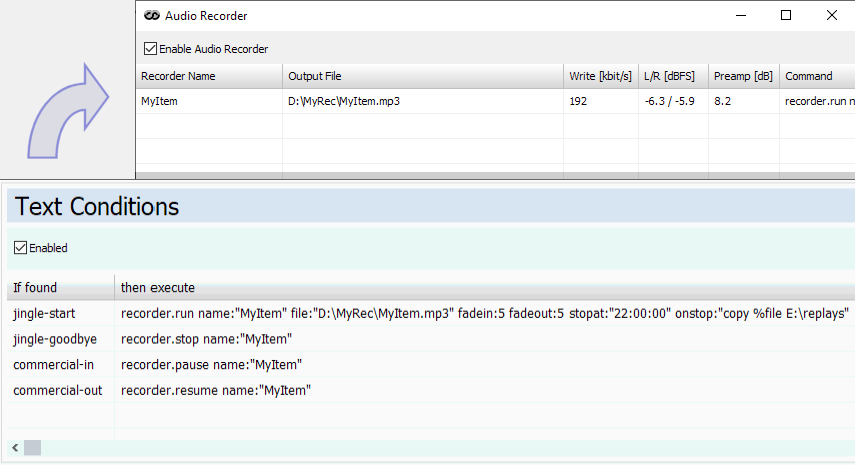
Record MP3 audio from a sound card or virtual audio cable. Capture a continuous programme archive or start and stop recordings by schedule and keywords in the incoming text.
Extend your setup with monitoring, remote access and repeatable configuration tasks.
Inspect transmitted RDS data with the integrated RDS Spy decoder on supported encoders.
Access device controls from a browser on your local network, including a phone or tablet.
Organise messages into campaigns and define when they appear in your text output.
Assign an individual connection or service to a specific network adapter.
Make supported monitoring information available to your station’s network management tools.
Explore RDS control and test a configuration with the built-in encoder emulator.
Your device may be capable of functions it does not support on its own.
Send commands or perform various operations based on the occurrence of keywords in texts.
Automate certain operations using a script or by controlling the system from an external application.
Take text from your automation system, a local file or an online source. Process it once and send it to your encoders, website or streaming service.
Explore external text sourcesA practical introduction to installation, connections and your first steps.
Read the introductionExplore supported encoder types, communication protocols and connection options.
See supported devicesDon't want to go on-air right away? Add a new Connection, kind RDS Encoder, model Demo Encoder.
Run the Demo Encoder and click on the RDS Spy button.
Run the installer and choose a folder. For a first installation, use a new folder.
Add your device and configure its connection. Follow the instructions in the encoder’s manual.
Set up your RDS content, link a text source or try the integrated tools.
Updating from Magic RDS 4: Close the application and install into its existing folder. Your settings are retained.
Moving from Magic RDS 3: Install Magic RDS 4 into a new folder. Version 4 is a separate application; a direct update from version 3 is not supported.
Need a hand with your setup?
Ask in the Pira.cz Technical ForumTake advantage of our direct shipping service
or ask your local vendor.

Your RDS could perform better. We offer complete product range: from single encoders to turnkey RDS solutions for broadcast network.

Measure FM modulation characteristics, MPX characteristics and analyze RDS content. Send alerts in the event of an outage.
Email: (Hidden by anti-SPAM)